Online Course: RISA Steel Building Workshop
Did you know that your can now attend the RISA Steel Building Workshop and earn 4 PDH's without leaving your house?! All five sessions from the...

Try the Complete RISA Suite for
10 Days FREE

RISA Education

Video Library

Online Help

Get Support

About Us
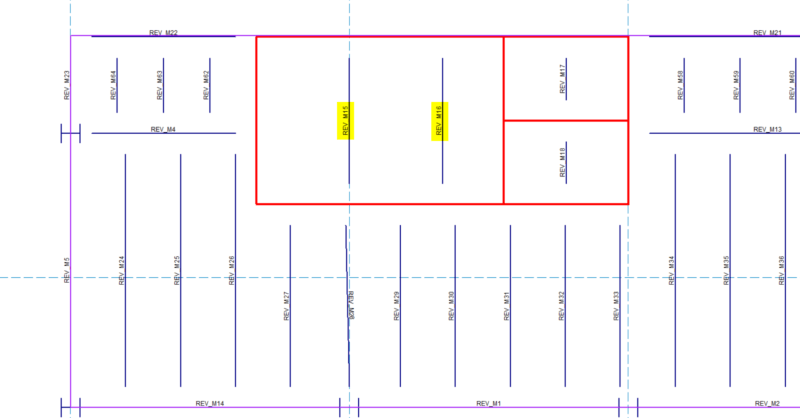
You can now customize the member and nodes names Revit uses during the export to RISA. When you export your Autodesk Revit model to RISA, the member and joint names are automatically altered with “REV” listed in front. This can helpful for you to identify that the model was created in Revit, however you can now change this prefix or eliminate it entirely.
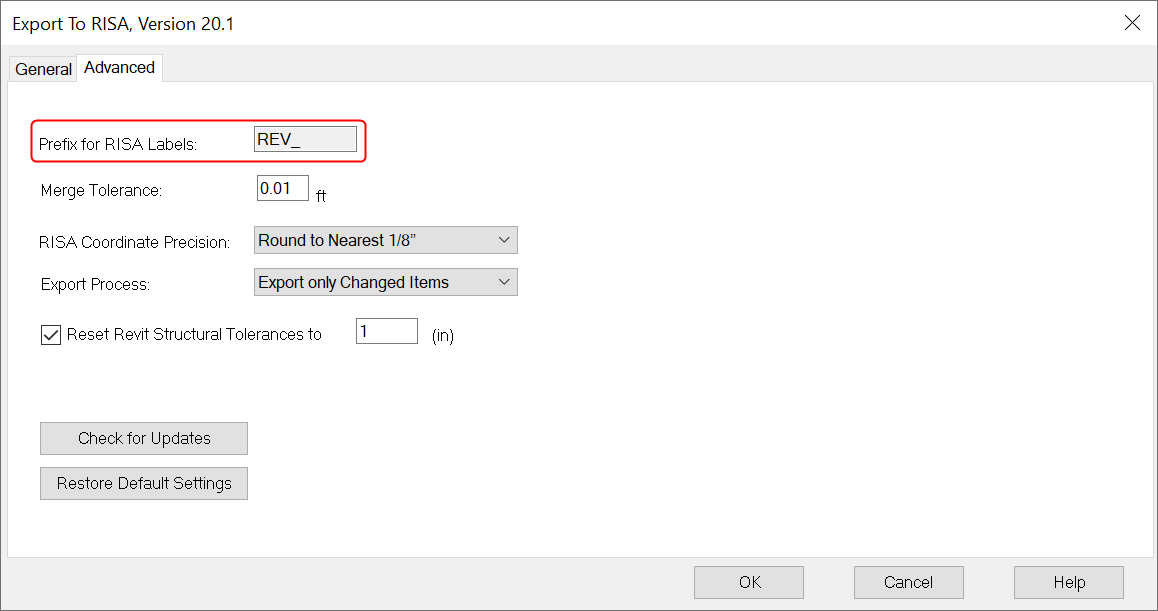
To do this, click on the Advanced tab and you can delete or modify the default the Element Prefix. When the model is transferred to RISA-3D or RISAFloor, you’ll see that the member and node names include this new prefix.
Did you know that your can now attend the RISA Steel Building Workshop and earn 4 PDH's without leaving your house?! All five sessions from the...

RISA is pleased to announce the release of the latest RISA-Revit Link which includes compatibility with Revit 2023. The RISA-Revit Link v23.0...
RISA is pleased to announce the release of the latest RISA-Revit Link which is compatible with Revit 2024. The RISA-Revit Link v24.0 allows...