 By: Admin

WEBINAR: What's New in the RISA Building System
Watch the recording of our webinar to learn how new versions of RISA-3D, RISAFloor, RISAFoundation and RISAConnection provide users with...

Try the Complete RISA Suite for
10 Days FREE

RISA Education

Video Library

Online Help

Get Support

About Us
RISAFloor, RISA-3D, and RISAFoundation all allow the user to export a model as a DXF file for use in most major CAD programs.
To create the DXF, simply select Export > DXF File from the File menu (if you are using RISAFloor or RISA-3D), or select DXF Export from the File menu if you are working in RISAFoundation.
This will open the Export DXF File dialog that allows you to control the DXF-specific settings, such as layer information and scale.
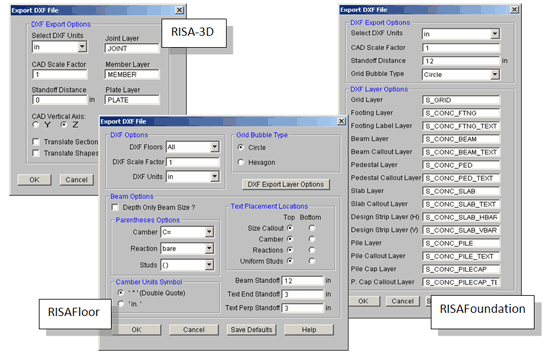
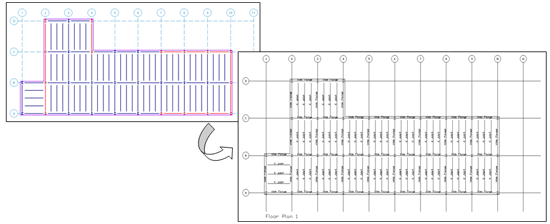
After selecting your options, click OK, and the program will create a DXF file for you. This file can then be opened by any program that reads DXF files.
Watch the recording of our webinar to learn how new versions of RISA-3D, RISAFloor, RISAFoundation and RISAConnection provide users with...

RISA software products use different sign conventions depending on the product’s purpose and typical use case. While the conventions are logical...
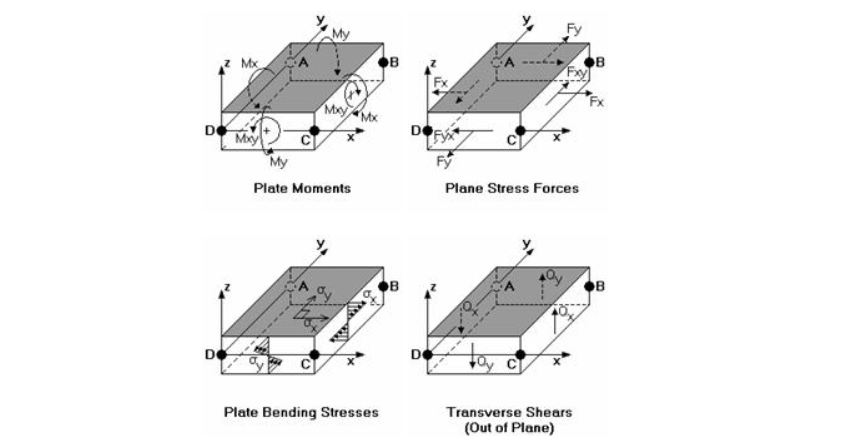
While members (beams and columns) follow conventions tied to their local axes, interpreting results for wall panels, plate elements, and design...