 By: Admin
Creating Custom Load Combinations (VIDEO)
RISA-3D, RISAFloor and RISAFoundation allow users to create custom load combination sets by modifying and expanding the underlying XML file used...

Try the Complete RISA Suite for
10 Days FREE

RISA Education

Video Library

Online Help

Get Support

About Us
With the release of ADAPT-Builder v21, a new load combination generator (LC Generator) provides users the option to automatically generate code compliant load combinations for use in the analysis and design of an ADAPT-Builder model. Included in this feature, is the ability to include automatic reversal of seismic and/or wind loads. In addition, the LC Generator includes options to add ASCE compliant combinations for the ACI code.
The LC Generator is implemented for all design codes available within ADAPT-Builder. ASCE specific combination options are available for all ACI codes with the exception of ACI 318-99.
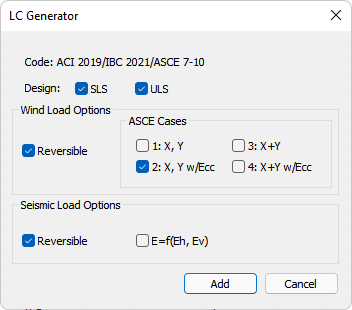
By default, the new LC Generator gives users the following options (which can be enabled or disabled) when automatically generating required design code combinations:
Design State: ULS (Strength Level) or SLS (Serviceability Level) Combinations
Reversible: When selected, two combinations for each wind/seismic load combination will be created (each with opposite signage)
ASCE Combinations: Combinations based on ASCE 7 with specific options for bi-directional and eccentric load combinations
Vertical/Horizontal Seismic Load Effects: Application of Vertical/Horizontal seismic load effects according to ASCE 7 12.4.2.3
The default load combinations (gravity) included by the program when the ACI 318-19 design code is selected are as follows:

Select the options in the LC Generator to have the program create load combinations for strength and serviceability, including both wind and seismic load effects. In this example the following options are used:

Note: To unlock the Wind load Options ASCE Cases section, as shown above, the user must assign wind loads, as building loads, in two orthogonal directions to the model.
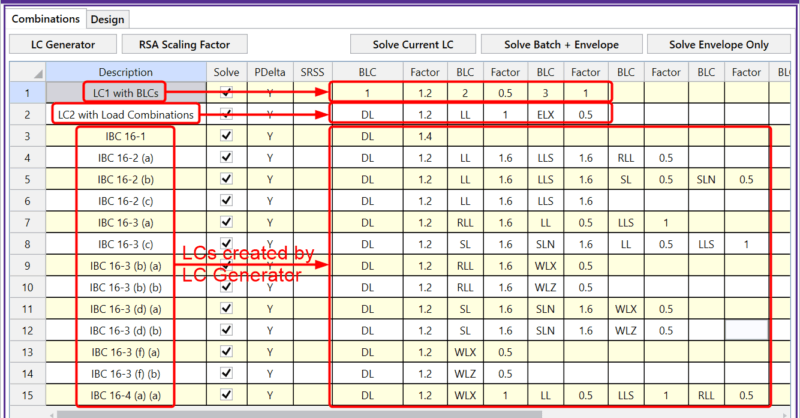
With the above selections made, clicking "Add" will then generate an additional 68 load combinations for evaluation during analysis and design. Some of the load combinations generated are visible in the figure below.

For more information on the LC Generator included in ADAPT-Builder v21, click the link below to review the ADAPT-Builder Help File and review the video included below:

RISA-3D, RISAFloor and RISAFoundation allow users to create custom load combination sets by modifying and expanding the underlying XML file used...
The Load Combinations spreadsheet in RISA-3D is limited to ten columns of BLC and Factor combinations. However, there are times where you may need...
One of the questions our support team receives often is the difference between Basic Load Cases (BLC), Load Categories and Load Combinations (LC)....