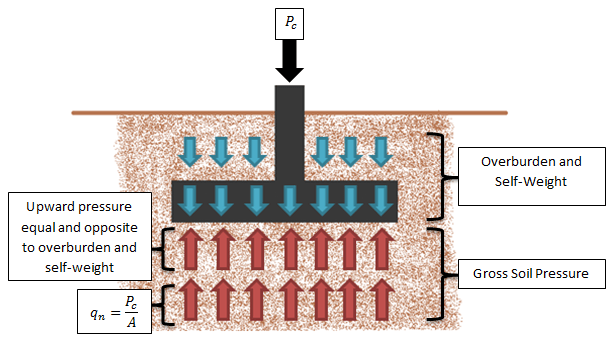
Soil Overburden on Mat Slab
RISAFoundation can apply soil overburden to a mat slab to account for the weight of the soil above the foundation. Simply enter a Soil Overburden...

Steel
Wood
Concrete
Education
RISA-3D
RISAFloor
RISAConnection
ADAPT-Builder
RISACalc
RISAFoundation
ADAPT-PT/RC
RISASection
RISA-2D
ADAPT-Felt
Link Utilities
![]()
Try the Complete RISA Suite for
10 Days FREE

Training
Webinars
Reach an Engineer
Tips & Tricks
Design Codes
Case Studies
New Features
Cloud Licensing

RISA Education
Video Library
Downloads
Licensing Support
Customer Portal
Product Documentation
System Requirements
Specifications
Online Help
Get Support
Contact
Careers
Employee Spotlight
Nemetschek
License Agreement
Privacy Policy
Open BIM
Partners

About Us
Halloween isn’t just for candy and costumes—it’s the perfect time to test your spooky engineering skills! We’ve brewed up a Halloween-themed RISA Jeopardy game, packed with fun, easy questions about our software. Tip for readers: Try to answer before revealing the “treat” below each question! 💀 Can You Count? 100 – RISACalc: How many components are currently available in RISACalc? 10 (Beam, Column, Steel Joist, Composite Beam, Retaining Wall, Spread Footing, Wall Footing, Drilled Pier, Seismic Load, Wind Load) 200 – FD: How many Data Entry spreadsheets are available in RISAFoundation? 25 300 – RISA-3D: How many countries or regions have building codes supported in RISA-3D? 9 (US, Canada, Mexico, Europe, Great Britain, India, Australia, New Zealand, Saudi Arabia) 🎃 Adaptable 100 – ADAPT: Which of these is not an ADAPT product? ADAPT-Builder, ADAPT-Felt, ADAPT-Floor, ADAPT-ABI ADAPT-Floor 200 – ADAPT: Which mode of ADAPT-Builder is used to design slabs-on-grade on expansive soils using the PTI method? ADAPT-SOG 🕸️ The Whole Family 100 – Other: This steel detailing software and fellow Nemetschek brand has a built-in export option in RISA-3D. SDS2 200 – Other: Which design code is the most common in our software, found in 8 of our 10 programs?…
Read More
RISAFoundation can apply soil overburden to a mat slab to account for the weight of the soil above the foundation. Simply enter a Soil Overburden...
RISAFoundation includes the added ability to enter a passive pressure for slabs. The passive pressure represents soil pressure along the perimeter of...
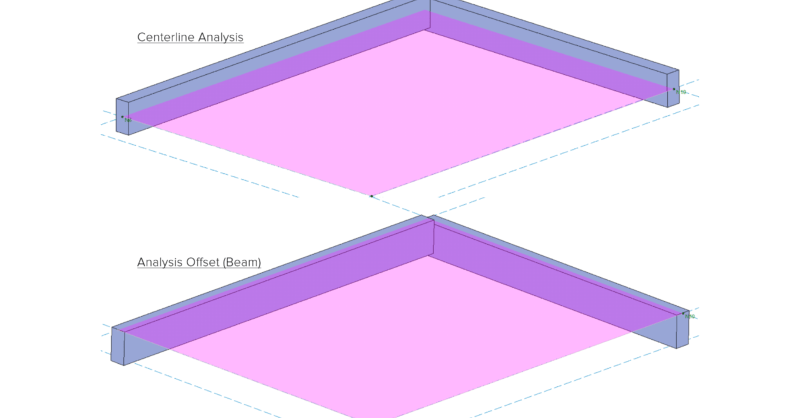
In RISAFoundation, you can add a vertical offset for slabs or beams. Traditionally, RISA uses centerline analysis which aligns all elements at their...
In RISAFoundation v8, you can add a shear splice between slabs so that it acts like a hinge. This is useful for modeling the effects of shear keys or...
In RISAFoundation, the user has the ability to manually draw a single Design Cut anywhere on a slab. The Design Strips also automatically include...
RISAFloor ES allows you to model concrete slabs of any thickness. However, there might be sections of the building that require a thicker slab. The...
In RISAFloor ES, you can quickly thicken the slab in the column strip area with the Drop Panel tool. The column strip is typically the area of...
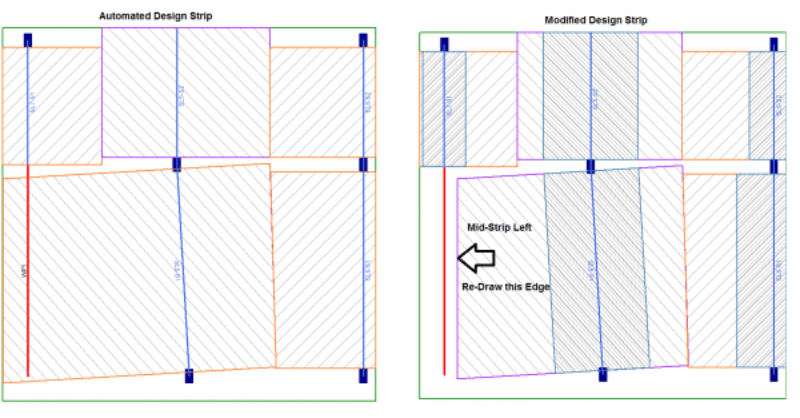
In RISAFloor ES, you draw a support line from support point to support point to define the Design Strips. The program will automatically create...
Our monthly "Structural Moment" newsletter is the best way to keep up with RISA’s product updates, new releases, new features, training events, webinars and more...