 By: Admin

How to Assign Column Base Boundary Conditions in RISAFloor
Column boundary conditions are set in RISAFloor per the Splice Type that you have set in the Columns spreadsheet. For any column at the lowest...

Try the Complete RISA Suite for
10 Days FREE

RISA Education

Video Library

Online Help

Get Support

About Us
RISAFloor has the ability to model column splices for all columns. You have the choice of a Moment or Shear splice depending upon what type of forces you want the splice to transfer. There are a few different ways to define your splices that give you flexibility in assigning them to your columns.
When defining a new floor you can specify the Splice Distance for all columns below that floor level as well as the splice type. This is a quick method to apply splices to all of your columns at once. You specify this in the Floors spreadsheet.

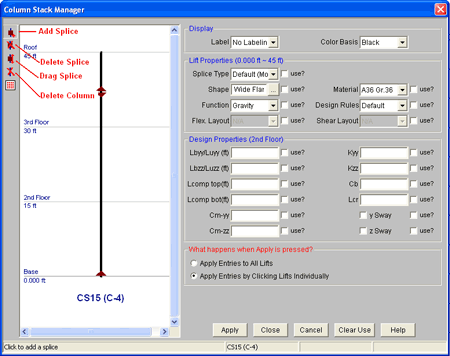
If you want to specify individual column splices or change just a few of the splices you defined in the Floors spreadsheet you can double click on any column to open the Column Stack Manager. The tools on the left allow you to add, delete or move/drag a splice as well as delete the entire column segment.
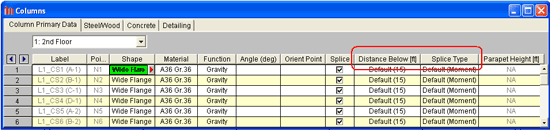
Another way to view and modify your column splices is from within the Columns spreadsheet.
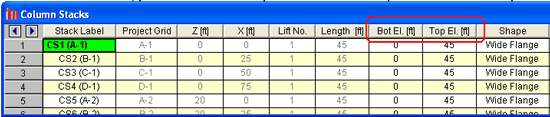
To view the Top and Bottom Elevation of your columns you can open the Column Stacks spreadsheet.
Something to note is that each column has at least one splice as RISAFloor considers the base of each column to be a splice point.
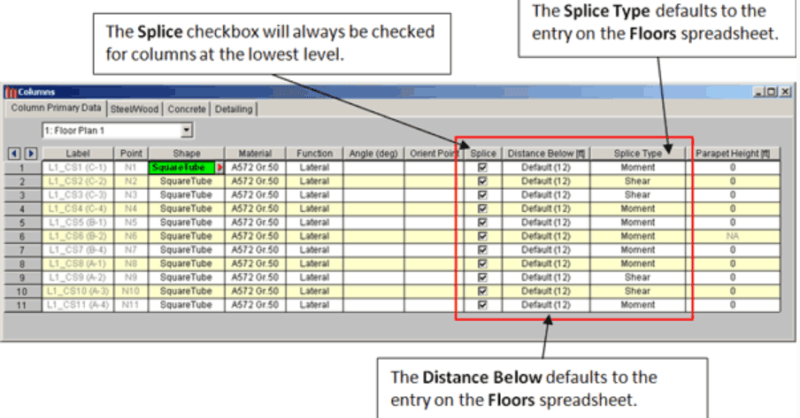
Column boundary conditions are set in RISAFloor per the Splice Type that you have set in the Columns spreadsheet. For any column at the lowest...
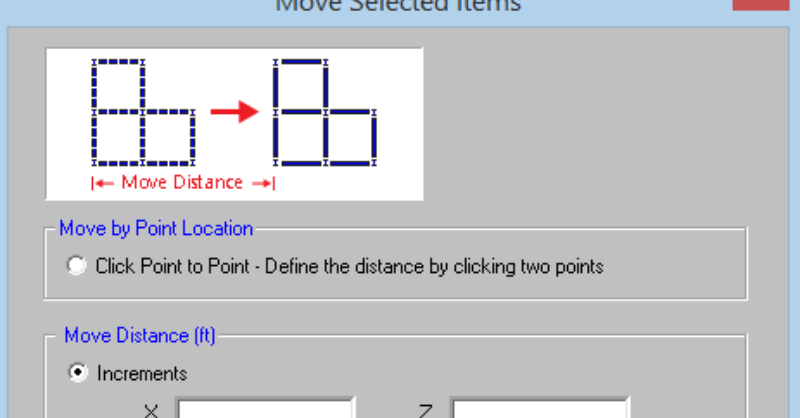
RISAFloor v11 includes the ability to re-position selected elements such as beams, columns, walls, and nodes in your model. On the Graphic Editing...

With the release of RISAFloor Version 16, users can now model, analyze and design hanger columns. This type of construction has been widely...